You need a workspace that reduces context switching and keeps projects, documents and revenue streams in one place. Buildin positions itself as an all-in-one AI workspace to create docs, databases, mind maps and timelines, manage projects, and sell premium content via subscriptions.
Understanding how it streamlines work is important because consolidating tools can save you time, improve focus and make collaboration more consistent.
Buildin
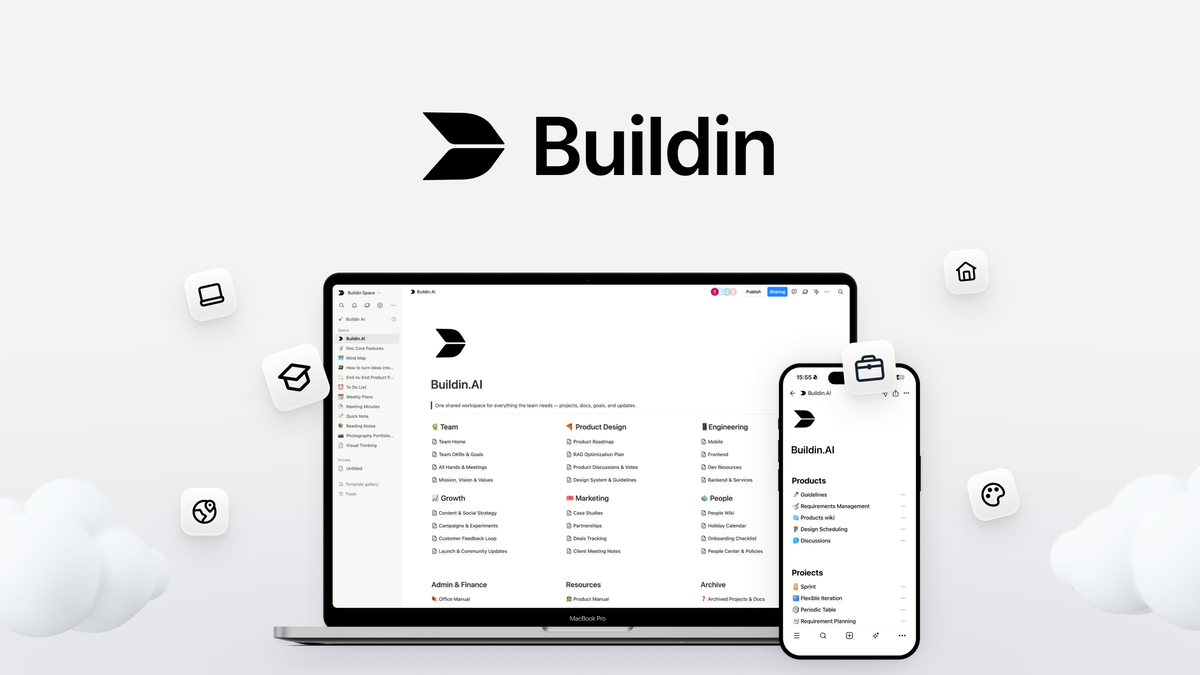
Buildin is the kind of workspace you turn to when you want fewer tabs and more focus. You can write docs, sketch mind maps, track projects with timelines and databases, and even sell gated content to subscribers without stitching together multiple tools.
For daily work it keeps meeting notes, project tasks and client deliverables in one place so you stop hunting for files. For special projects like product launches or proposal sprints you can map ideas, assign timelines and generate draft copy with the built-in AI to move faster.
If you want a single platform that covers content, planning and basic monetization, Buildin is worth trying because it reduces context switching and speeds up repetitive writing and organization.
What People Say
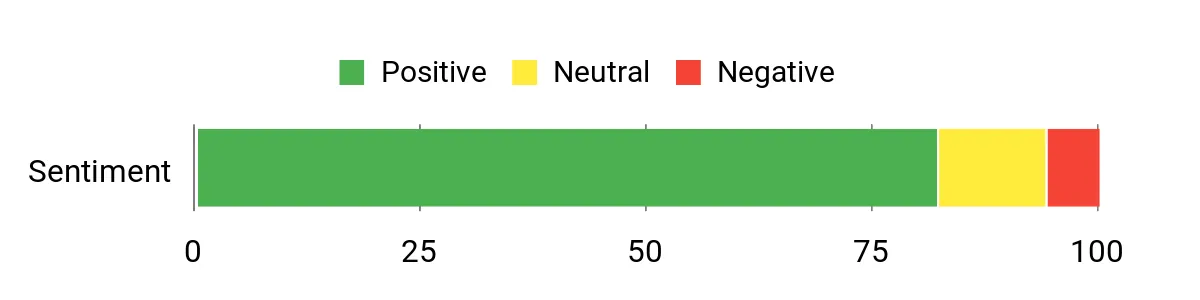
Feedback commonly praises Buildin’s ability to replace several single-purpose tools by bringing content creation, project tracking and monetization together. Users appreciate the AI features for drafting and the convenience of synchronized pages, while a smaller number note limits around advanced integrations or enterprise-grade security features.
Overall Sentiment: Positive
🗣️ Product Manager
I consolidated docs, project timelines and paid content into a single workspace, which cut down on tool-jumping. The AI drafting helped me produce proposal templates and meeting summaries much faster, and syncing across pages kept everyone aligned.
🗣️ Freelance Designer
The mind maps and databases are surprisingly flexible. I built a lightweight CRM and project board, and the timelines made client delivery dates easy to visualize. Setting up paid subscriptions for premium guides was straightforward and saved time compared with separate platforms.
|
Pros |
Cons |
|---|---|
|
✅ Integrated AI tools that help with drafting and organization |
❌ Integrations with some external apps can be limited compared with specialized tools |
|
✅ Multiple content and project views (docs, mind maps, timelines, databases) |
❌ Advanced customization and enterprise security features may be lacking for large organizations |
|
✅ Monetization features for selling subscription content |
❌ Some power-user workflows might require a learning period to set up |
|
✅ Synchronized platform reduces context switching |
Long-Term Cost Benefits
By consolidating several subscriptions into one workspace and reducing the time spent switching between apps, you can lower your monthly SaaS spend and reclaim billable hours. Over time those savings add up, especially if you use the platform for both project work and paid content.
Return on Investment
At a one-time or low recurring cost of $49, you can justify Buildin if it replaces two or more paid tools or saves even a few hours per week for you or your team. The faster drafting and centralized project tracking translate into quicker deliverables and potentially higher billable output.
Situational Benefits
|
Situation |
How It Helps |
|---|---|
|
Freelancers handling client campaigns |
You can keep proposals, timelines and deliverables in one workspace and use AI to draft recurring client communications, saving setup time for each campaign. |
|
Small teams planning product launches |
Timelines and databases help you coordinate milestones and dependencies while shared docs keep design, content and engineering aligned. |
|
Creators selling premium guides |
Built-in subscription options let you host and monetize content without integrating separate e-commerce tools. |
Time-Saving Benefits
You save time by using AI to generate drafts and templates, by reusing databases and views across projects, and by avoiding repetitive file transfers between different apps. The synced workspace means updates propagate where you need them, cutting down status-checking and revision loops.
Ease of Use
|
Feature |
Ease Level |
|---|---|
|
Docs |
Easy |
|
Mind Maps |
Easy |
|
Timelines |
Moderate |
|
AI Tools |
Easy |
|
Onboarding and Setup |
Moderate |
Integrations
|
Software |
Integration Quality |
|---|---|
|
Zapier |
Good |
|
Google Drive |
Moderate |
|
Slack |
Limited |
Collaboration
Buildin keeps edits and timelines synchronized across users, so you can comment on docs, assign tasks in databases and share timeline views. Shared pages and subscription access controls help you manage who sees what without moving content between systems.
Workflow Management
Use databases and timelines to build repeatable workflows, connect tasks to documents and visualize deadlines. The combination of views makes it easy to switch perspective from high-level roadmaps to detailed task lists.
Key Benefits
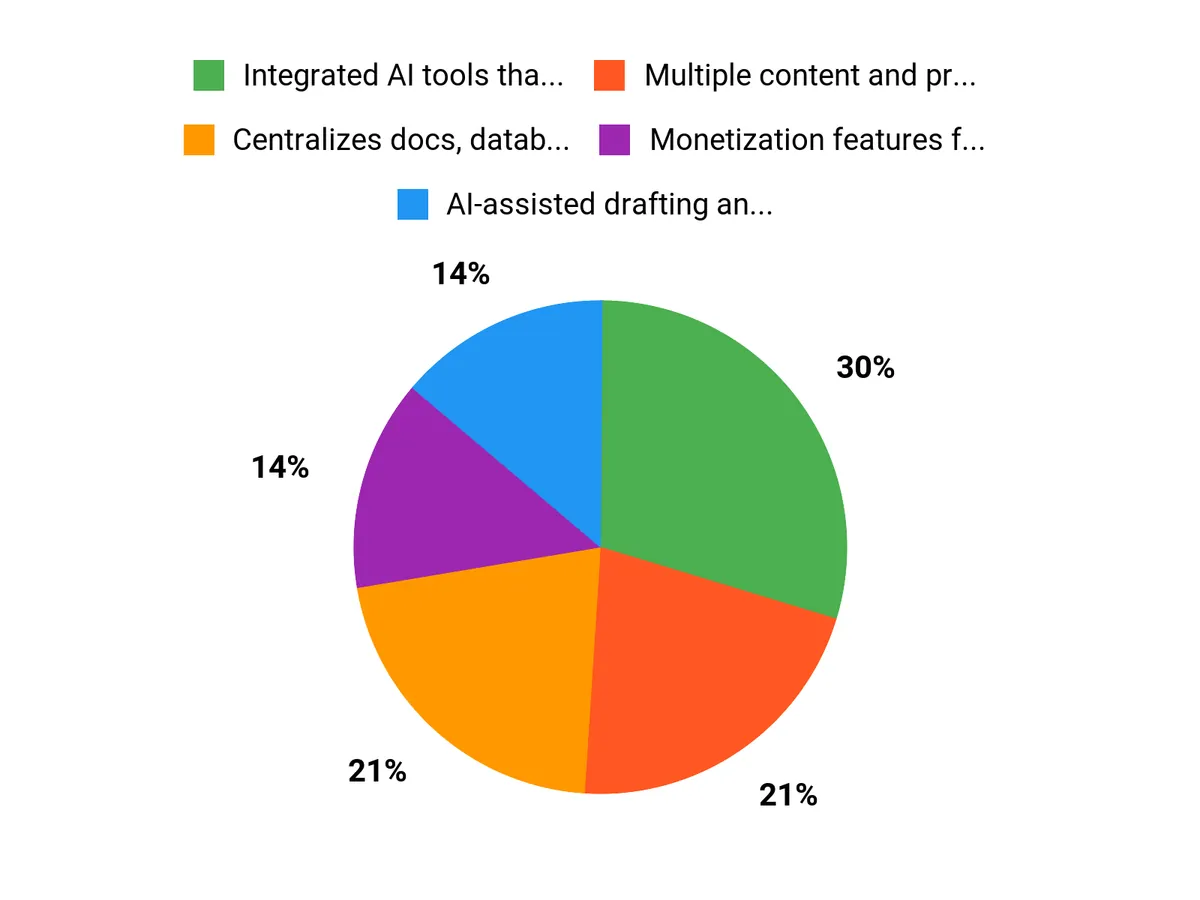
- Centralizes docs, databases, mind maps and timelines into one synchronized workspace
- AI-assisted drafting and organization to speed up routine content tasks
- Built-in monetization with paid subscription options for premium content
- Improves collaboration by keeping edits and timelines in sync for teams
Current Price: $49
Rating: 4.71/5
FAQ
Is Buildin Right For My Team?
Buildin works well if you want to centralize notes, project timelines, databases and simple monetization in one place, making it a good fit for freelancers, small teams and creators who value reduced tool switching. You can use the AI to speed up drafting and the timelines and databases to coordinate deliverables, but if your team needs deep enterprise integrations or advanced compliance features you should test those workflows before committing.
Try mapping your current tools to Buildin’s core features and run a short pilot to confirm it covers your most critical needs.
How Secure Is My Data On Buildin?
You should review Buildin’s official security and privacy documentation to confirm details like encryption, access controls and data retention, and enable any available account protections such as strong passwords and two-factor authentication. For added safety, export regular backups of key content and use subscription access controls for premium material, and if you have strict regulatory or compliance requirements verify those with the vendor before migrating sensitive data.
Can I Replace Other Tools And Save Money?
If you currently pay for multiple apps for docs, basic CRM, timelines and content hosting, Buildin’s consolidated approach can reduce subscription costs and save time, and at a price of $49 the platform can pay for itself quickly if it replaces two or more services you use regularly. To maximize savings, list the tools you’d replace, confirm feature parity for your key workflows and test integrations, and factor in the time saved from fewer context switches as part of your decision.
Why Customers Choose Buildin
You choose Buildin because it centralizes docs, databases, mind maps and timelines into a single synchronized workspace, reducing context switching and keeping projects organized. Its built-in AI speeds up drafting and the subscription features let you monetize content, making it a practical, cost-effective option at $49 for freelancers and small teams.
Wrapping Up
Buildin is an all-in-one AI workspace rated 4.71/5 and priced at $49, designed to help you create documents, databases, mind maps and project timelines while managing projects and selling premium content from a single synchronized platform. If you want to reduce tool sprawl and centralize project work and content monetization, Buildin offers a feature set and AI assistance that can speed up routine tasks and improve collaboration. The platform delivers strong value for professionals who need broad functionality in one place, though you should confirm that its integrations and security meet any specialized requirements you have. Overall, Buildin is a practical, budget-friendly option for professionals seeking a consolidated workspace.
This content is reader-supported. When you click through links we may earn a referral commission on qualifying purchases.